The way people search online is changing faster than ever. Instead of browsing multiple websites, many users now ask ChatGPT, Gemini, Claude, and Perplexity for direct answers.
This shift means ranking #1 on Google is no longer enough. Your brand also needs to appear in AI-generated responses where people are making buying decisions and discovering new products.
That is where Rank Math AI Visibility comes in. It helps you monitor your brand across AI platforms by tracking mentions, citations, sentiment, competitors, and your overall AI Visibility Score.
In this guide, I’ll show you how to use Rank Math AI Visibility and explain every feature step by step. By the end, you’ll know how to monitor your brand in AI search and understand what the data means for your SEO strategy.
Why Monitoring AI Search Matters?
The way people discover brands has changed dramatically. Instead of clicking through search results, many users now rely on AI-generated answers to make decisions.
When AI platforms recommend your business, they often mention your brand and include citations from trusted sources. These mentions help build authority and influence how people view your products or services.
Traditional SEO tools can tell you where your website ranks on Google, but they cannot show how often AI platforms recommend your brand. That means you could be missing valuable insights about your visibility across AI search.
This is why AI Visibility is becoming the next important SEO metric. By tracking AI mentions, citations, and overall brand presence, you can understand how your business performs beyond traditional search engines.
What is Rank Math AI Visibility?
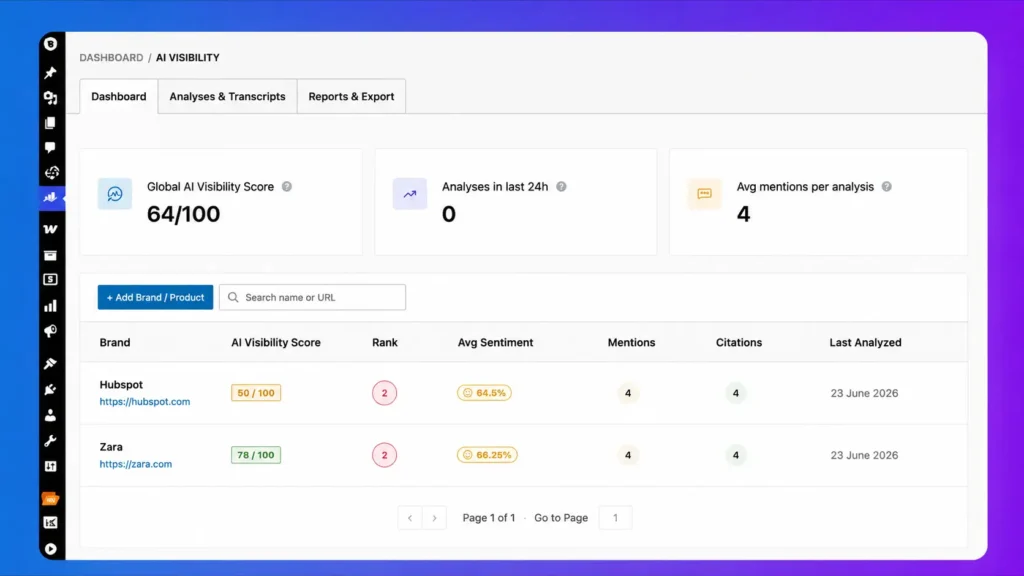
Rank Math AI Visibility is a new feature that helps you measure your brand’s presence across popular AI search platforms. It is currently designed to make AI search monitoring simple from your WordPress dashboard.
The AI Visibility Dashboard brings all your important metrics into one place. You can monitor brand mentions, AI citations, sentiment, and your overall AI Visibility Score without using multiple tools.
Instead of checking every AI platform manually, Rank Math automatically collects and analyzes your brand data. This saves time and gives you a clear picture of your AI search performance.
Since everything works directly inside WordPress, you can manage both traditional SEO and AI Visibility from one dashboard. This makes it easier to optimize your website for the future of search.
Step 1: Enable the AI Visibility Module
Rank Math AI Visibility is a paid feature of the Rank Math SEO plugin, so you’ve to purchase their Pro plan to use the AI visibility features on your WordPress website.
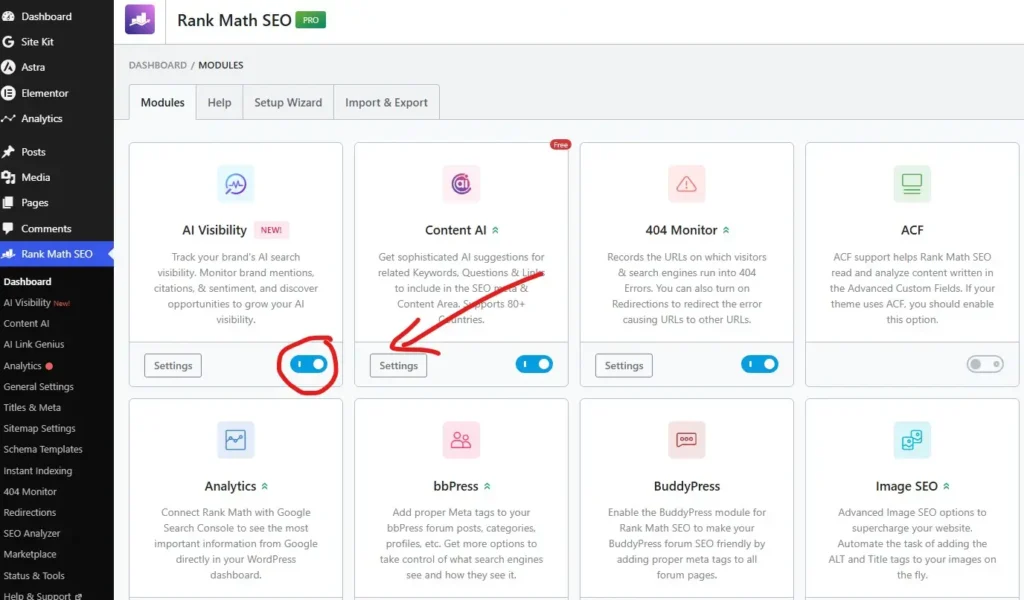
After installing and activating the Pro plan, hover your mouse over Rank Math SEO and click on AI Visibility. Then this page will open.
Now you’ve to find AI Visibility features and enable them.
Step 2: Add Your Brand
Once you log in to the AI Visibility dashboard, you’ll see this kind of interface. Now you’ve to add your first brand using Rank Math AI Visibility.
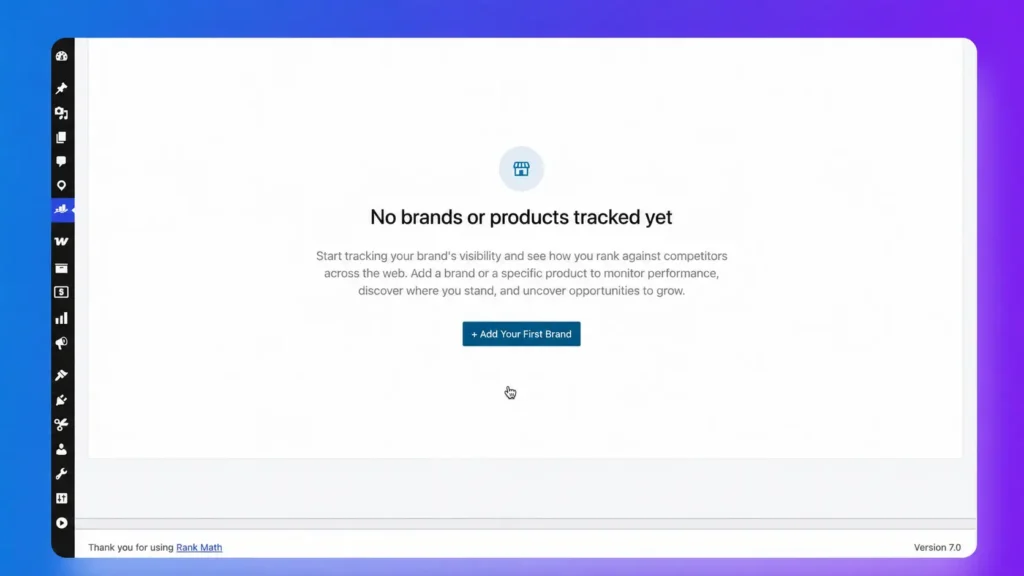
To add your first brand, you’ve to click on the Add Your First Brand button.

Then this pop-up will appear. Now you’ve to add your Brand/Product Name, Brand/Product URL, Description, Target Country, Interval, and AI Platform.
After selecting all of them, you’ve to scroll down and click on the Create Brand Button.
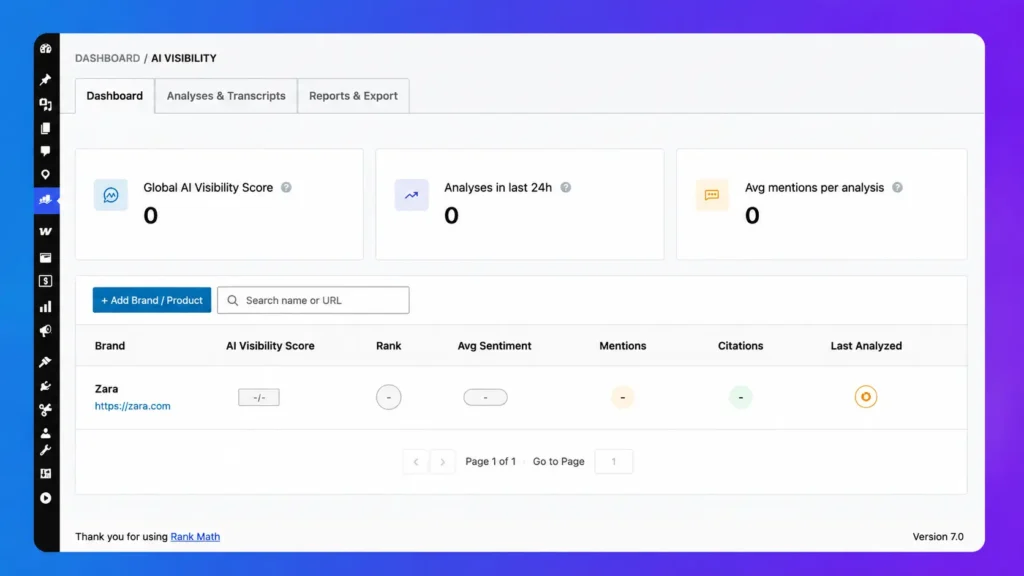
Now you’ve to wait for something; in that time, Rank Math AI Visibility features will add your brand to different ChatGPT models.
Step 3: Let AI Visibility Analyze Your Brand
Once your brand is added, Rank Math AI Visibility begins analyzing it across supported AI platforms. You do not need to submit prompts manually or monitor each AI chatbot yourself.
The analysis process runs automatically in the background and may take some time to complete. Depending on your queue and available quota, the first results usually appear after the analysis finishes.
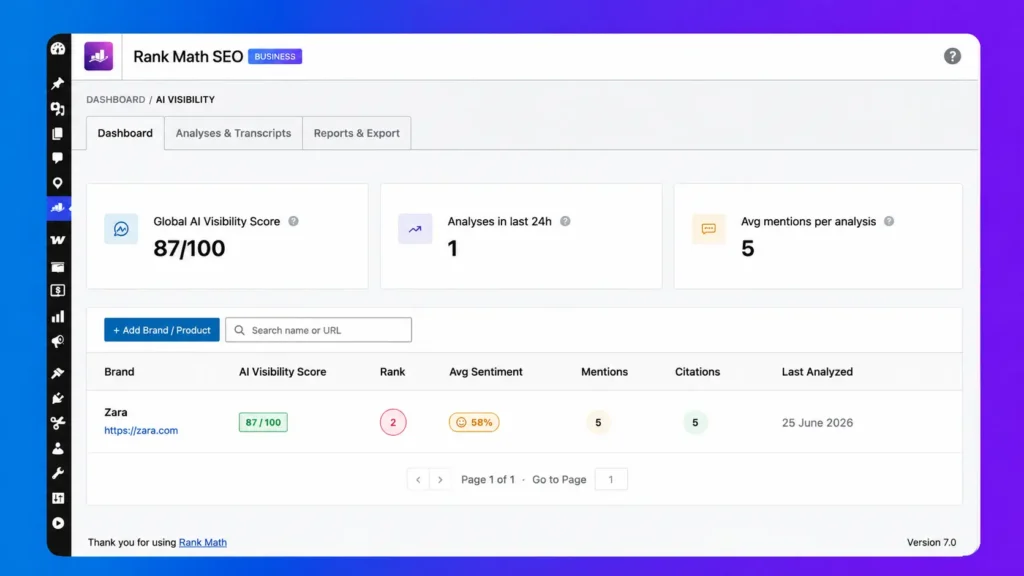
After the scan is complete, open the AI Visibility Dashboard to review your results. Here, you can see your AI Visibility Score, total mentions, citations, sentiment, and the latest analysis date.
This dashboard gives you a quick overview of how AI platforms view your brand. Instead of guessing your AI presence, you can track real data and monitor your progress over time.
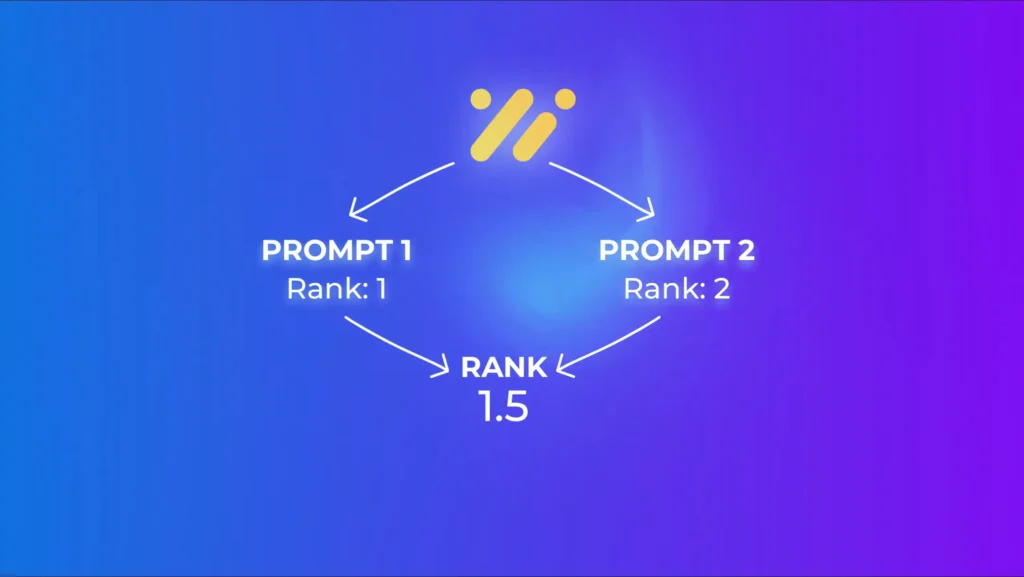
Rank Math calculates your average AI ranking by combining the position of your brand across multiple prompts.
For example, if your brand ranks #1 for one prompt and #2 for another, your average rank becomes 1.5, giving you a more accurate view of your overall visibility instead of relying on a single AI response.
Understanding the AI Visibility Dashboard
The AI Visibility Dashboard gives you a complete overview of your brand’s performance across AI search platforms. At the top, you can see the Global AI Visibility Score, which reflects your overall visibility and average performance across all analyzed prompts.
If you manage multiple brands, the dashboard lets you compare their visibility health in one place. It also shows recent analyses and average mentions, making it easy to monitor your AI search progress over time.
Below the overview cards, each tracked brand includes detailed performance metrics such as AI Visibility Score, average Rank, Mentions, Citations, Sentiment, and the Last Analyzed date. Together, these metrics help you understand how often your brand appears, how AI platforms describe it, and how well it performs compared to previous analyses.
The dashboard also includes quick action buttons for every brand. You can view detailed results, edit your brand information, or pause tracking whenever needed, making it simple to manage and optimize your AI visibility directly from WordPress.
Brand Tracking Results Explained
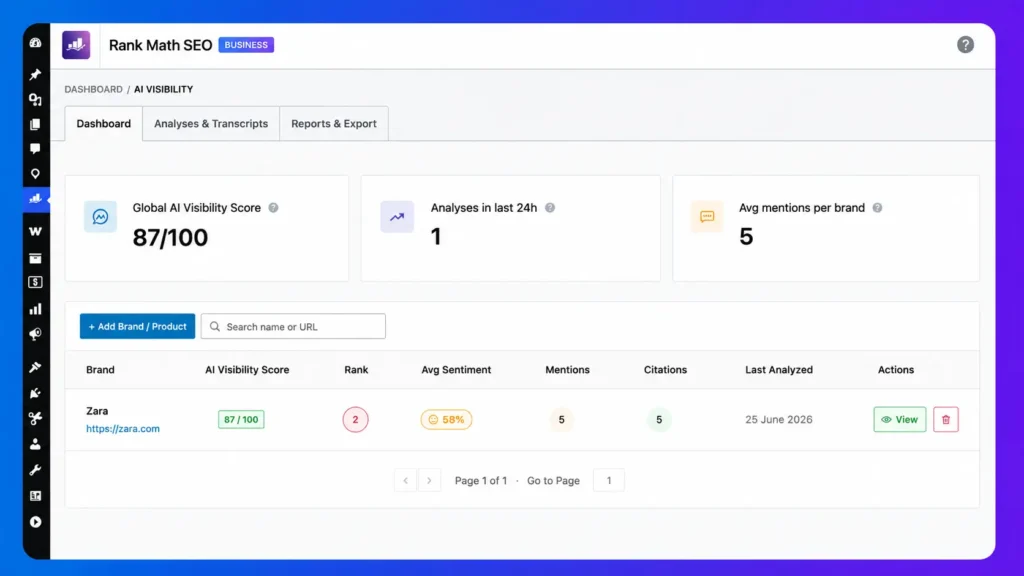
To get your brand tracking results you’ve to click on the Green View button under the action tab.
Overview
The Overview tab gives you a quick summary of your brand’s overall AI search performance. It highlights the most important metrics, so you can understand your AI visibility without reviewing every individual prompt.
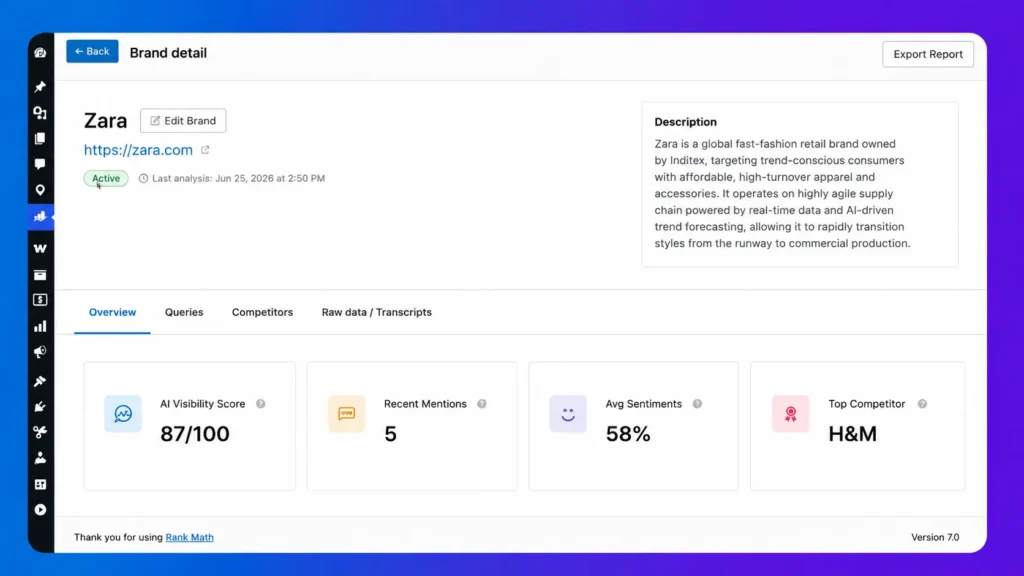
The AI Visibility Score shows how visible your brand is across supported AI platforms. You can also see your recent Mentions and Citations, which indicate how often AI models mention your brand and reference your website.
Another important metric is the Average Sentiment score, which shows whether AI platforms describe your brand positively, neutrally, or negatively. Tracking this score helps you understand how AI systems perceive your brand over time.
The Overview tab also displays your Top Competitor based on the analysis results. This makes it easy to compare your AI visibility with competing brands and identify opportunities to improve your overall presence in AI search.
Queries
The Queries tab shows the AI-generated prompts that Rank Math creates for your brand automatically. These prompts are based on real customer intent, helping AI platforms analyze your brand in realistic search scenarios.
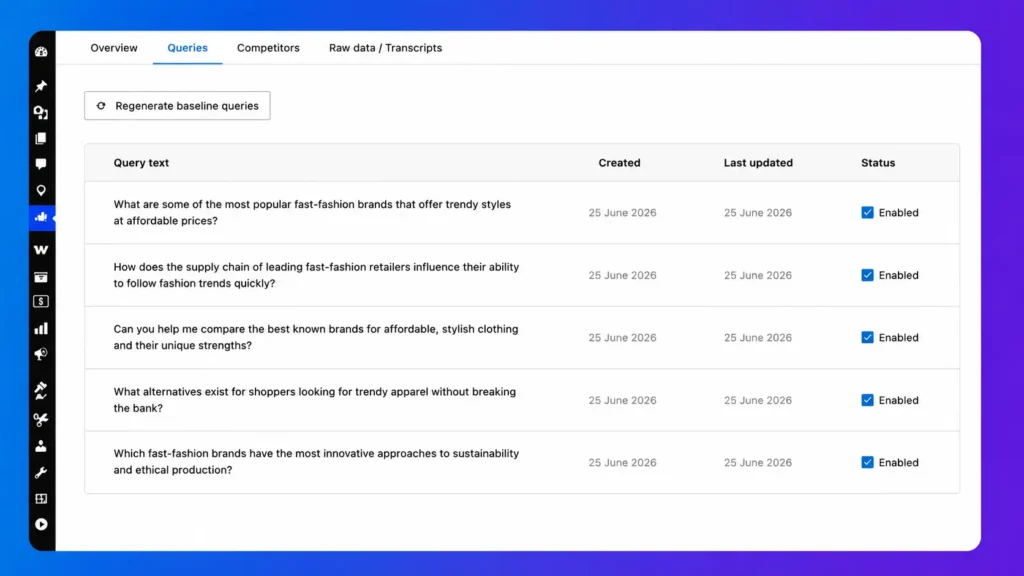
By default, Rank Math generates up to five natural language prompts that people are likely to ask AI tools like ChatGPT, Gemini, Claude, and Perplexity. This gives you broader coverage instead of relying on a single search query.
If your business or content changes, you can click the Regenerate Baseline Queries button to create a fresh set of prompts. This ensures your analysis stays aligned with your current products, services, and audience.
Rank Math also refreshes these prompts on a regular schedule to keep your AI tracking up to date. Using fresh, intent-focused queries helps produce more accurate AI Visibility results over time.
Competitors
The Competitors tab helps you discover which brands AI platforms mention alongside your own. Instead of manually researching competitors, Rank Math automatically identifies them from real AI-generated responses.
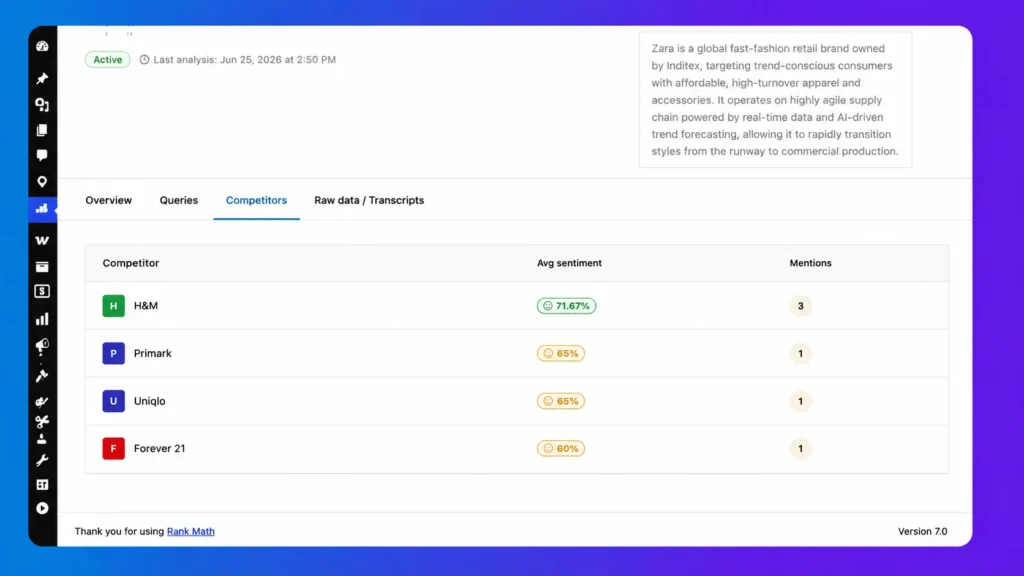
You can compare your brand with competing brands using key metrics like mentions and average sentiment. This makes it easier to see who has stronger AI visibility and where your brand stands in comparison.
The sentiment comparison also shows how positively or negatively AI platforms describe each competitor. These insights can reveal why certain brands receive more favorable recommendations in AI search.
One of the biggest advantages of this tab is finding hidden competitors you may not have considered before. By identifying these brands early, you can improve your content strategy and strengthen your visibility across AI search platforms.
Raw Data & Transcripts
The Raw Data & Transcripts tab lets you see exactly how AI platforms evaluated your brand. It displays the original prompt, the complete AI response, and the full transcript for every analysis.
You can review the original prompt to understand what question was asked and how it reflects real customer search intent. This helps you see why your brand was or wasn’t mentioned in AI-generated answers.
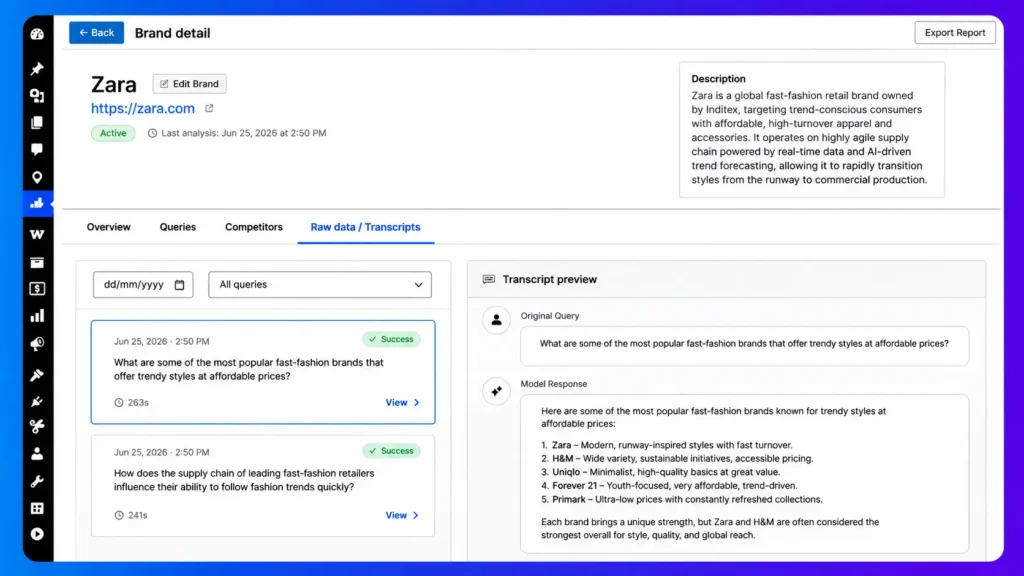
The transcript includes the complete AI response without any summaries or missing details. This gives you full transparency into how AI models describe your brand and your competitors.
Rank Math also extracts important signals such as brand mentions, sentiment, and exact citations from every response. These insights make it easier to verify AI results, identify trusted sources, and improve your brand’s visibility across AI search platforms.
Analysis & Transcripts
Analyses & Transcripts page gives you a centralized view of every AI Visibility scan across all your tracked brands. You can quickly see the latest analysis date and open any run for more detailed insights.
Use the built-in brand, status, and date filters to find specific analysis runs in seconds. This makes it easy to review recent scans, compare historical results, or focus on a single brand.
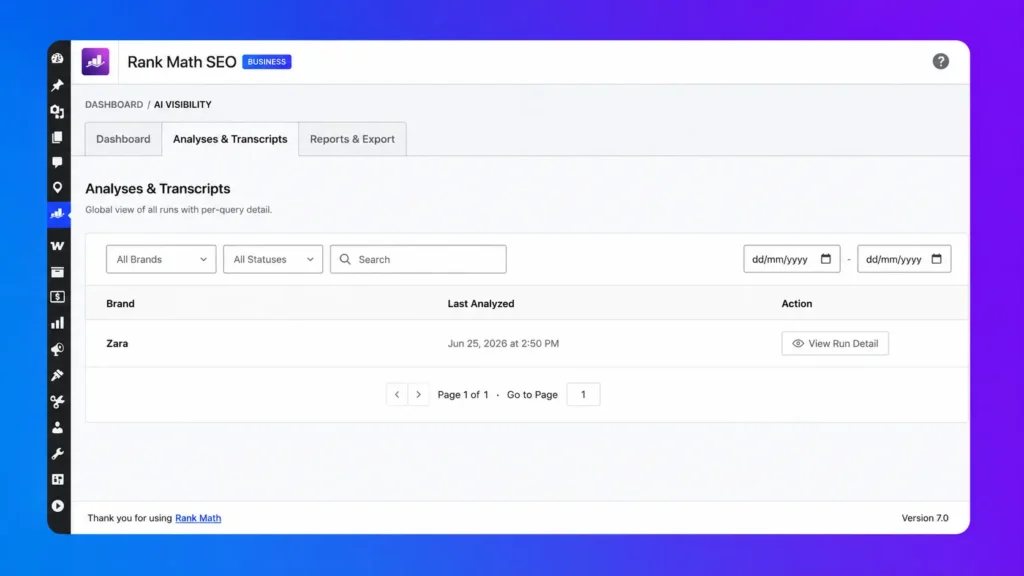
Each analysis includes detailed run information, including the AI prompts that were tested and the sentiment score for each response. This helps you understand how different AI platforms perceive your brand across multiple queries.
By opening the Transcript Viewer, you can read the complete AI response for every prompt instead of relying on summaries. This gives you full transparency into brand mentions, exact citations, and the context behind every AI-generated answer.
Reports & Export
Reports & Export tab lets you generate a preview of your AI Visibility report before downloading it. It summarizes key metrics like your AI Visibility Score, sentiment, mentions, citations, rankings, and top competitors in one place.
You can export your report in JSON format, making it easy to analyze the data with tools like ChatGPT, Claude, or your own custom workflows. Rank Math also plans to support PDF reports, making sharing even more convenient.
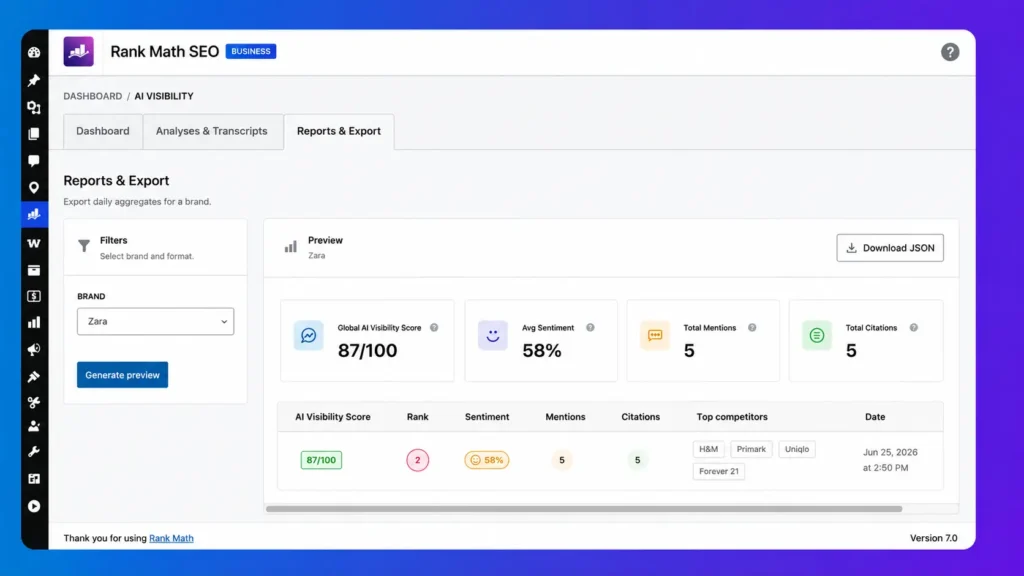
These exports are useful for deeper AI analysis, allowing you to compare performance over time or generate custom insights with AI assistants. Instead of manually collecting data, you can work directly with structured reports.
For agencies and marketing teams, the reporting feature simplifies client reporting by providing clear, professional summaries of AI visibility performance. It saves time while making it easier to communicate results, progress, and opportunities to clients or stakeholders.
AI Visibility Pricing
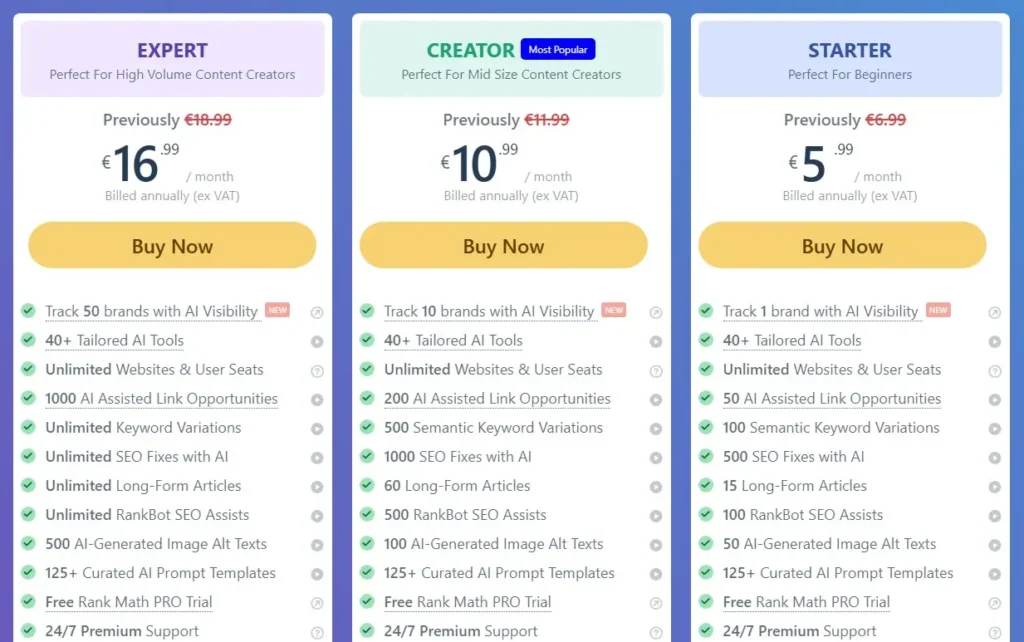
AI Visibility is included with Rank Math Content AI plans, so you don’t need a separate subscription. The number of brands you can track depends on your selected plan.
Along with AI Visibility, you also get AI Link Genius, Content AI, and Semantic Keyword Variations. This gives you a complete AI-powered SEO toolkit in a single package.
Whether you’re a blogger, business, or agency, each plan is designed to help you improve both traditional SEO and AI search visibility. As your needs grow, you can upgrade to track more brands and unlock higher AI usage limits.
Frequently Asked Questions (FAQ)
Rank Math AI Visibility is a feature that monitors how AI platforms like ChatGPT, Gemini, Claude, and Perplexity mention your brand. It tracks AI mentions, citations, sentiment, competitors, and your overall AI Visibility Score.
It monitors major AI search and answer engines, including ChatGPT, Google Gemini, Claude, and Perplexity, to measure your brand’s visibility across AI-generated responses.
The score is based on factors such as brand mentions, citations, rankings across AI prompts, sentiment, and overall visibility in AI-generated answers.
Yes. The number of brands you can track depends on your Content AI plan. Higher-tier plans support tracking more brands simultaneously.
Rank Math automatically refreshes and regenerates AI prompts on a regular basis to keep them aligned with changing search behavior and user intent.
Yes. The Raw Data & Transcripts section lets you view the original prompts, full AI responses, transcripts, extracted signals, and exact citations.
Yes. Rank Math automatically detects competing brands mentioned alongside yours and lets you compare visibility, mentions, and sentiment.
Yes. You can export your data in JSON format, with PDF reports planned for future releases, making it easy to share results with clients or your team.
No. AI Visibility complements traditional SEO by helping you optimize for AI-generated answers while continuing to improve your Google rankings.
It’s ideal for bloggers, businesses, agencies, eCommerce stores, and content creators who want to monitor and improve their brand presence in AI search.
Conclusion
AI search is changing the way people discover brands, and traditional SEO alone is no longer enough. If your brand isn’t appearing in AI-generated answers, you’re missing a growing source of visibility and potential customers.
Rank Math AI Visibility makes it easy to monitor your brand across platforms like ChatGPT, Gemini, Claude, and Perplexity. From AI mentions and citations to sentiment analysis and competitor tracking, everything is available inside your WordPress dashboard.
The best strategy for 2026 is to combine traditional SEO with AI optimization. By improving your website’s authority, creating high-quality content, and tracking your AI Visibility, you’ll be ready for both search engines and AI-powered search experiences.
If you’re already using Rank Math, AI Visibility is one of the most valuable features to start using today. It gives you the insights you need to measure, improve, and grow your brand’s presence in the future of search.